


Fudget: Monthly Budget Planner
4.5170.00 Reviews
App Specs
- Version
- 2.0.23
- Updated On
- License
- Free
- Downloads
- 100,000+
- Developer
- Danny Connell
- Categories
- Finance
- Platform
- Android
Screenshots
 Analysis by AppCompare
I like Fudget: Monthly Budget Planner for a very specific reason: it makes budgeting feel like a small routine rather than a finance project. I can write down money coming in and going out, then check what remains without first connecting accounts or building a complicated system. That directness is its main strength, though it also means it won’t suit everyone. If you want automatic transaction imports, bill reminders, or detailed financial reports, you’ll probably need a more full-featured tool.
Fudget is a free finance app from developer Danny Connell, and its focus is on keeping monthly plans and everyday spending manageable. It’s rated for Everyone, has reached over 100,000 installs, and holds an average rating of 4.6 from around 2,100 ratings. The current version is 2.0.23, and it runs on Android 7.0 or later. Optional in-app purchases range from $2.49 to $19.99 per item, so it’s worth checking what an upgrade includes before paying if you’re considering one.
Why a low-friction budget can work
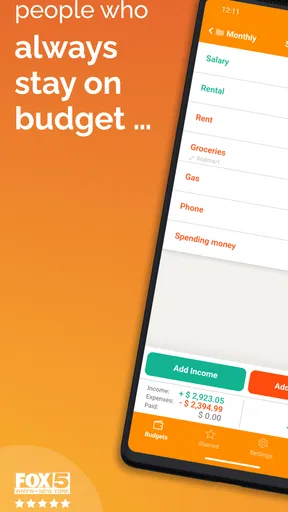
When I first opened Fudget, I was greeted with a clean and minimalist interface. There's no need to sign up or link any bank accounts, which immediately sets a relaxed tone. You just dive right into creating lists of income and expenses. The lack of clutter is refreshing, especially if you've ever been overwhelmed by overly complex finance apps.
Easy setup, with a useful planning habit
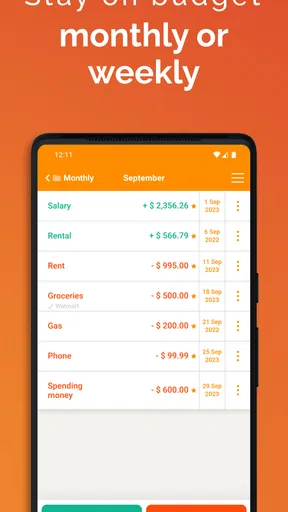
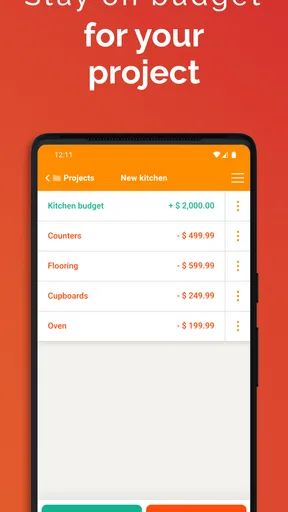
Setting up my budget was as easy as pie. You start by creating lists for different categories, like groceries, bills, or savings. It's all done with a few taps, and you can easily adjust amounts or add notes to each entry. I loved how I could see everything in one place without flipping through multiple screens.
The app’s design is very intuitive. A few taps here and there, and you've got your budget set up. No need to be a financial wizard to understand your spending habits. The simplicity of it all is a breath of fresh air.
For a more useful first setup, I’d avoid trying to account for every possible purchase. Start with the predictable items—rent, regular bills, groceries, transport—and leave a little room for the spending that varies. That makes the remaining balance easier to interpret. You can always split a broad category later if it hides a pattern you want to address. The practical trade-off is that the quality of the picture depends on how consistently you enter things yourself.
Recording spending while it still matters
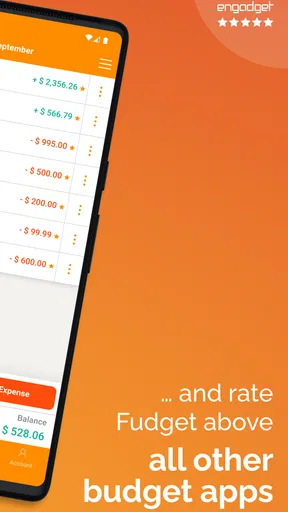
Keeping track of expenses is where Fudget really shines. I found myself jotting down expenses as soon as they happened. With each entry, you can see how much you have left in your budget, which really helps you stay on track. It's like having a little financial assistant in your pocket. I also appreciate that there's no need to categorize everything into minute detail – simplicity is key here.
Worth Reading Before You Choose

EA SPORTS FC Mobile 26 Is a Bigger Football Game, but It Takes Time

Flipboard Shows What News Apps Must Do Beyond the Feed

Switching to Android Auto Means Rethinking Your Driving Routine

Google Calendar Makes a Crowded Week Easier to Manage

Ludo King Makes the Most of the Minutes Between Plans

Baby Panda World Brings Quick Play to Modern Phones, but Its Game Library Feels Busy
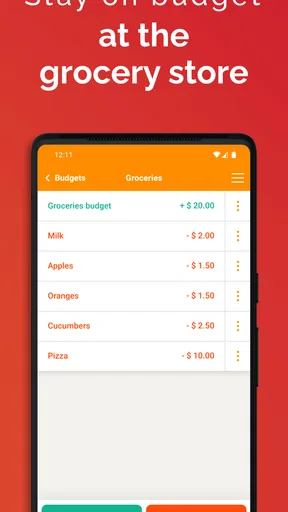
That immediate remaining amount is useful in small decisions, not just month-end reviews. Imagine stopping for groceries after work: if you enter the cost when you pay, you can check the amount left in that part of your plan before deciding whether to add a nonessential item. The app doesn’t make that choice for you; it gives you a simple running reference. For this workflow to hold up, I’d set a regular moment to catch up on missed entries, such as after unpacking shopping or checking receipts at the end of the day.
There’s also a useful distinction between planning and accounting. A manual list can help me decide where money should go, even when a purchase hasn’t happened yet, but it won’t quietly reconcile itself against a bank balance. I’d treat the figures as a personal working budget and compare them with account activity separately when accuracy matters. That’s a fair exchange for avoiding account linking, but it is a real limitation for anyone who wants the app to do the bookkeeping automatically.
Personalization without turning budgeting into a project
While Fudget is simple, it doesn't mean it's not flexible. You can customize the currency and the way you handle your lists. If you're someone who loves a bit of personalization, you'll enjoy tweaking things to fit your style. It's all about making the app work for you, not the other way around.
A good way to keep a monthly plan readable is to use categories that answer actual decisions. “Food” may be enough if you only need one spending limit; separating groceries from takeout is more useful if those are competing for the same money. I wouldn’t create a long list just because the option is there. Too much detail makes manual entry slower, and a budget that feels tedious is easier to abandon. The sweet spot is the smallest set of lists that helps you change a choice.
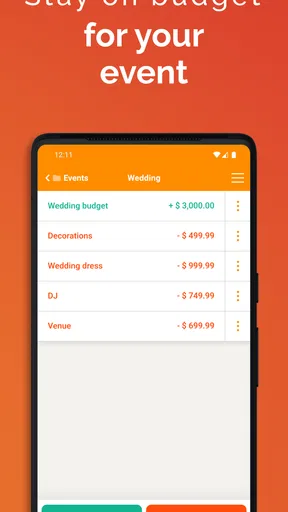
For an irregular expense—say, a birthday gift or a seasonal household purchase—I’d include a line in the month where I expect to pay rather than letting it disappear into a broad category. This doesn’t make the app a long-term savings planner by itself, but it can make an upcoming cost visible before it catches me off guard. If your income changes from month to month, a conservative starting figure is more useful than budgeting around an unusually good month.
Keeping a copy and looking beyond the phone
One of the features I found particularly handy is the ability to backup and export your data. You can save your financial data to Dropbox, ensuring that you don't lose your information. Plus, if you like to analyze your spending on a bigger screen, you can export your data as a CSV file. It’s a small but mighty feature that adds to the app's appeal.
Those options make the app more practical for someone who wants a lightweight daily tool but still prefers to review figures elsewhere. A CSV file can be opened in a spreadsheet for sorting or comparing entries, while a backup gives you another way to preserve your work. I’d make a backup after establishing a routine or before changing devices, rather than assuming that a list on one phone is the only copy I’ll ever need. Exporting is also a sensible route if your needs grow and you later want to move toward more detailed analysis.
Another highlight is that there are no ads in the free version. You can focus on your finances without distractions, which is a huge plus in my book.
Where it fits among budgeting apps
Compared with bank-connected budget apps, this one asks more of you: you enter transactions yourself and decide how to organize them. In return, its lists avoid the noise of a feed full of imported activity and keep the focus on the plan you chose. Compared with a spreadsheet, it’s easier to use for quick entries on a phone, while a spreadsheet is usually better when you want formulas, custom summaries, or more elaborate month-to-month comparisons. A notebook can be just as private and simple, but it won’t offer the same convenient on-phone totals and exportable file.
That makes it a strong match for someone who wants a clear spending limit and is willing to maintain it manually. It is less convincing for a household that needs several people to coordinate one live budget, or for anyone who expects automatic categorization and alerts to do the follow-up. Before choosing it, I’d ask one practical question: will I remember to enter purchases? If the honest answer is no, an app that imports transactions may be a better fit, even if it feels busier.
It can also work as a short-term reset rather than a permanent system. For a month, I could track the categories that feel slippery—takeout, small convenience purchases, or subscriptions I want to review—without rebuilding every aspect of my finances. At the end, the export offers a way to examine the entries outside the app. That’s a focused use, and it avoids demanding a level of detail that may not be worth maintaining all year.
Who should try it—and who may want more
So, is Fudget worth a try? Absolutely. If you're someone who prefers simplicity and efficiency over bells and whistles, this app is for you. It’s perfect for individuals who want to keep their finances in check without getting lost in the details.
While it might not have the advanced features some power users crave, like bill reminders or automatic transaction tracking, its straightforward approach is exactly what makes it appealing. You get to focus on what matters: understanding and managing your budget.
I’d recommend it to a student keeping a weekly eye on food and transport, a freelancer setting aside a working amount for essentials, or anyone trying to stop a few discretionary categories from quietly expanding. It’s also approachable if you have never stuck with a budget before, because you can begin with a handful of entries instead of designing an elaborate financial dashboard. For shared household planning, complex debt payoff schedules, investment tracking, or automatic account reconciliation, I’d look elsewhere. Those needs depend on tools and workflows beyond the appeal of a simple list.
A straightforward verdict
Overall, I'd say Fudget: Monthly Budget Planner is a great tool for anyone looking to make budgeting less of a chore and more of a habit. Give it a whirl and see how it fits into your financial routine. You might just find it’s the budgeting companion you didn’t know you needed!
My recommendation comes with one condition: give the manual approach a fair test. Build a modest monthly plan, enter purchases close to when they happen, and review the remaining amounts before the categories reset. If that rhythm helps you make better everyday choices, the app’s restraint is a benefit rather than a missing feature. If you repeatedly forget entries or need the app to warn you about upcoming bills, that’s a clear sign to choose a more automated alternative. For a free, uncluttered starting point, though, this is an easy way to see whether a simple budget can become part of your routine.
Pros
- Simple and intuitive interface.
- No ads for distraction-free use.
- Offline access to your budget.
- Quick and easy expense tracking.
- Supports multiple currencies.
Cons
- Limited advanced features.
- No bank integration available.
- Customization options are minimal.
- No cloud sync for backups.
- Lacks detailed financial reports.
FAQs for Fudget: Monthly Budget Planner
What is Fudget, and how does it help with budgeting?
Fudget is a straightforward budgeting app designed to simplify financial planning by allowing users to easily track income and expenses. It helps users manage their finances by providing a clear overview of their budget, assisting in making informed financial decisions, and avoiding overspending. This app is ideal for those who prefer a minimalist approach without the complexity of other budgeting tools.
Is Fudget available on both Android and iOS platforms?
Yes, Fudget is available for download on both Android and iOS devices. The app can be accessed through Google Play Store for Android users and the Apple App Store for iOS users. This cross-platform availability ensures that users can manage their budgets seamlessly across different devices.
Does Fudget require an internet connection to function?
No, Fudget does not require an internet connection to function. It is designed to work offline, making it convenient for users to access and update their budget information anytime and anywhere. This feature is particularly useful for those who travel frequently or have limited internet access.
Are there any additional costs or in-app purchases in Fudget?
Fudget offers a free version with basic features, but users can upgrade to Fudget Pro for a one-time fee. The Pro version includes additional features such as themes, export options, and more customization. This allows users to choose a plan that best fits their financial planning needs without any recurring subscription fees.
How secure is my financial information in Fudget?
Fudget prioritizes user privacy by storing all data locally on the user’s device, minimizing the risk of data breaches. Since the app does not require an internet connection, there is no cloud storage involved, which further enhances security. Users should ensure their device is protected with a passcode or biometric lock for added security.


